How to build your own Search Engine
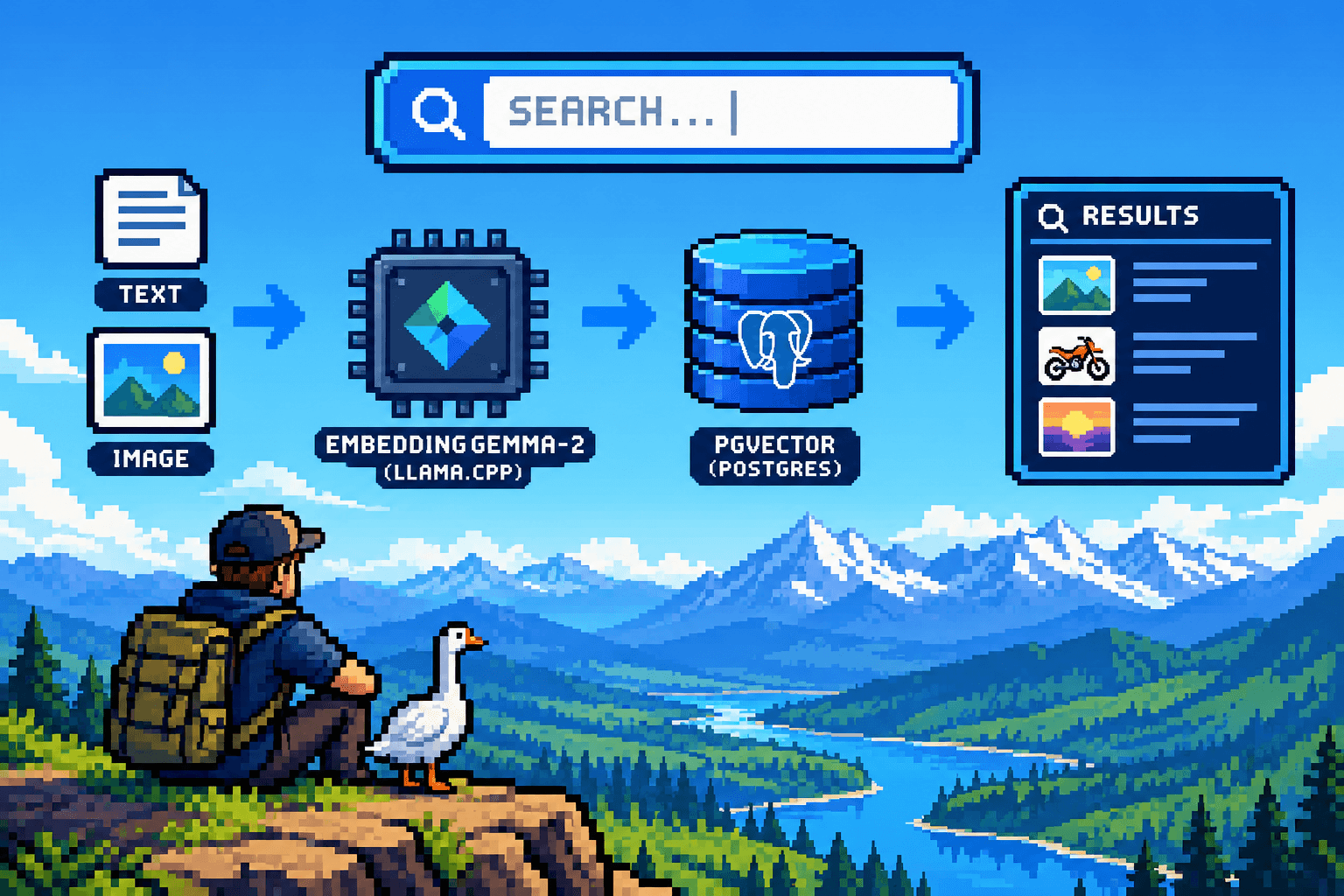
Traditional keyword search falls short when users want to search using images or search semantically across unstructured text. By combining ASP.NET Core, Entity Framework Core, pgvector, and Google’s embeddinggemma-2 running locally via llama.cpp, you can build a fully local, privacy-first multimodal search engine from scratch.
Why this Tech Stack?
- ASP.NET Core & Blazor: Blazor Server enables rich, real-time UI interactions using C# components over SignalR without needing a separate JavaScript SPA framework.
- MediatR (CQRS Pattern): Implements Command Query Responsibility Segregation, cleanly decoupling write operations (commands for creating/updating posts) from read/search operations (queries) for maintainability and testability.
- pgvector & llama.cpp: Brings vector database capabilities directly into PostgreSQL and allows high-performance, local execution of open multimodal embedding models without relying on external cloud APIs.
This guide walks you through building a complete forum application with semantic text search and reverse image similarity search. While built here as a self-contained demo, this architecture serves as a foundational building block that can be scaled into a powerful multimodal search tool or integrated directly into advanced RAG (Retrieval-Augmented Generation) pipelines.
Prerequisites & Local Setup
Before diving into the code, ensure your local services are up and running.
💡 Need detailed installation steps? If you are setting this up for the first time, feel free to search Google for detailed tutorials on installing
pgvector, compilingllama.cpp, and downloading GGUF model files.
1. Example Setting up PostgreSQL & pgvector on Fedora
Install PostgreSQL and the pgvector extension via DNF, initialize the database cluster, and start the service:
sudo dnf install postgresql-server postgresql-contrib pgvector
sudo postgresql-setup --initdb
sudo systemctl enable --now postgresql
Next, configure your database and enable the extension using the exact credentials referenced in our application connection string (Username=postgres, Password=pg, Database=forum):
sudo -u postgres psql
Inside the psql shell:
CREATE DATABASE forum;
\c forum;
CREATE EXTENSION vector;
\q
2. Setting up llama.cpp & embeddinggemma-2
Clone and build llama.cpp following its official repository guide, download the GGUF weights for Google's embeddinggemma-2, and start the server so it listens on http://localhost:8080:
./llama-server -m ./models/embeddinggemma-2.gguf --embedding --port 8080
Step 0: Project Setup & NuGet Packages
Before writing code, initialize a new ASP.NET Core Blazor project using the .NET CLI and add the necessary NuGet dependencies for database operations, vector support, MediatR, and AI integration.
Run the following commands in your terminal:
# Create a new Blazor web project
dotnet new blazor -o SearchEngine
cd SearchEngine

# Install the required NuGet packages with specified versions
dotnet add package MediatR --version 14.2.0
dotnet add package Microsoft.Extensions.AI.OpenAI --version 10.11.0
dotnet add package Npgsql.EntityFrameworkCore.PostgreSQL --version 10.0.3
dotnet add package Pgvector.EntityFrameworkCore --version 0.3.0
1. Define the Database Schema & Models
First, define your domain models. Because embeddinggemma-2 maps both text and images into the same unified vector space, you can store text and image embeddings inside a single table column.
Technical Insight (HNSW Indexing): We use an HNSW (Hierarchical Navigable Small World) index with cosine distance (
vector_cosine_ops). Instead of performing a costly brute-force sequential scan across every row in the database, HNSW constructs a multi-layer graph structure that allows for lightning-fast Approximate Nearest Neighbor (ANN) searches even as your dataset grows to millions of embeddings.
DataAccess.cs
using Microsoft.EntityFrameworkCore;
using Pgvector;

public class Post
{
    public int Id { get; set; }
    public string Title { get; set; } = "";
    public string Body { get; set; } = "";
    public byte[]? Image { get; set; }
    public string? ImageType { get; set; }
    public List<PostEmbedding> Embeddings { get; set; } = [];
}

public class PostEmbedding
{
    public int Id { get; set; }
    public Post Post { get; set; } = null!;
    public Vector Value { get; set; } = null!;
}

public record PostDto(int Id, string Title, string Body, bool HasImage)
{
    public double? Distance { get; init; }
}

public class ForumDb(DbContextOptions<ForumDb> options) : DbContext(options)
{
    public DbSet<Post> Posts => Set<Post>();
    public DbSet<PostEmbedding> Embeddings => Set<PostEmbedding>();

    protected override void OnModelCreating(ModelBuilder b)
    {
        b.HasPostgresExtension("vector");
        // embeddinggemma2 stores multimodal within the same vector space,
        // so we can use a single column for both text and image embeddings
        b.Entity<PostEmbedding>().Property(e => e.Value).HasColumnType("vector(768)");
        // HNSW index for approximate nearest-neighbour search using cosine distance.
        b.Entity<PostEmbedding>().HasIndex(e => e.Value)
            .HasMethod("hnsw")
            .HasOperators("vector_cosine_ops")
            .HasStorageParameter("m", 16)
            .HasStorageParameter("ef_construction", 64);
    }
}
2. Implement the Multimodal Embedder Client
Next, create an Embedder service that talks to your local llama.cpp instance. It formats text with retrieval query prefixes when searching and formats binary images as base64 data URIs for multimodal embedding generation.
Technical Insight (L2 Normalization): Before returning the vector, we apply L2 Normalization (
vector[i] /= norm). Normalizing vectors to a unit length (magnitude = 1) ensures that calculating Cosine Distance simplifies mathematically to an optimized inner product/dot product calculation. It also prevents magnitude bias, ensuring that longer texts or higher-resolution images don't disproportionately dominate the similarity scores.
Note
Google's embeddinggemma-2 architecture applies L2 normalization natively as its final step. You don't need to L2 normalize your embeddings if you use the full 768-dimensional output directly from the model. You must L2 normalize after slicing. If you skip this, your vector similarity search accuracy will degrade severely and silently without throwing any errors. Hence why this step has been included in this tutorial as a demonstration.
Embedder.cs
using System.Net.Http.Json;
using System.Text.Json;
using Microsoft.Extensions.AI;
using Pgvector;

public class Embedder(IEmbeddingGenerator<string, Embedding<float>> generator, HttpClient http)
{
    // query prefix configuration for retrieval/search
    private const string QueryPrefix = "task: search result | query: ";

    public async Task<Vector> Text(string text, bool isQuery = false)
    {
        string input = isQuery ? QueryPrefix + text : text;
        var embedding = await generator.GenerateVectorAsync(input);

        var floats = embedding.ToArray();
        Normalize(floats);

        return new Vector(floats);
    }

    public async Task<Vector> Image(byte[] image, string modelName = "embeddinggemma2", string mediaType = "image/png")
    {
        var dataUri = $"data:{mediaType};base64,{Convert.ToBase64String(image)}";

        var requestBody = new
        {
            model = modelName,
            input = new object[]
            {
                new
                {
                    content = new object[]
                    {
                        new
                        {
                            type = "image_url",
                            image_url = new { url = dataUri }
                        }
                    }
                }
            }
        };

        var response = await http.PostAsJsonAsync("/v1/embeddings", requestBody);
        response.EnsureSuccessStatusCode();

        var json = await response.Content.ReadFromJsonAsync<JsonElement>();
        var embeddingArray = json.GetProperty("data")[0].GetProperty("embedding");

        var floats = embeddingArray.EnumerateArray()
            .Select(x => x.GetSingle())
            .ToArray();

        Normalize(floats);
        return new Vector(floats);
    }

    private static void Normalize(float[] vector)
    {
        float sumSquares = 0;
        for (int i = 0; i < vector.Length; i++)
        {
            sumSquares += vector[i] * vector[i];
        }

        float norm = (float)Math.Sqrt(sumSquares);
        if (norm > 0)
        {
            for (int i = 0; i < vector.Length; i++)
            {
                vector[i] /= norm;
            }
        }
    }
}
3. Implement CQRS Handlers with MediatR
Using MediatR keeps your business logic clean and modular. The search handler computes cosine distance against stored vectors using pgvector.EntityFrameworkCore, automatically matching either text queries or uploaded images to the most relevant posts.
Technical Insight (CQRS with MediatR): CQRS (Command Query Responsibility Segregation) separates actions that mutate data (
AddPost,UpdatePost,DeletePost) from those that read data (GetPosts,SearchPosts). MediatR dispatches these requests to isolated handlers, enforcing the Single Responsibility Principle and making unit testing and request pipelining trivial.
Handlers.cs
using MediatR;
using Microsoft.EntityFrameworkCore;
using Pgvector.EntityFrameworkCore;

public record AddPost(string Title, string Body, byte[]? Image, string? ImageType) : IRequest<int>;
public record UpdatePost(int Id, string Title, string Body, byte[]? NewImage, string? NewImageType) : IRequest;
public record DeletePost(int Id) : IRequest;

public class AddPostHandler(IDbContextFactory<ForumDb> factory, Embedder embedder)
    : IRequestHandler<AddPost, int>
{
    public async Task<int> Handle(AddPost r, CancellationToken ct)
    {
        var post = new Post { Title = r.Title, Body = r.Body, Image = r.Image, ImageType = r.ImageType };

        post.Embeddings.Add(new() { Value = await embedder.Text($"{r.Title}\n{r.Body}") });
        if (r.Image is not null)
            post.Embeddings.Add(new() { Value = await embedder.Image(r.Image) });

        await using var db = await factory.CreateDbContextAsync(ct);
        db.Posts.Add(post);
        await db.SaveChangesAsync(ct);
        return post.Id;
    }
}

public class UpdatePostHandler(IDbContextFactory<ForumDb> factory, Embedder embedder)
    : IRequestHandler<UpdatePost>
{
    public async Task Handle(UpdatePost r, CancellationToken ct)
    {
        await using var db = await factory.CreateDbContextAsync(ct);
        var post = await db.Posts.Include(p => p.Embeddings).FirstAsync(p => p.Id == r.Id, ct);

        post.Title = r.Title;
        post.Body = r.Body;
        if (r.NewImage is not null) { post.Image = r.NewImage; post.ImageType = r.NewImageType; }

        // Simplest possible: throw away the old vectors and re-embed
        post.Embeddings.Clear();
        post.Embeddings.Add(new() { Value = await embedder.Text($"{r.Title}\n{r.Body}") });
        if (post.Image is not null)
            post.Embeddings.Add(new() { Value = await embedder.Image(post.Image) });

        await db.SaveChangesAsync(ct);
    }
}

public class DeletePostHandler(IDbContextFactory<ForumDb> factory) : IRequestHandler<DeletePost>
{
    public async Task Handle(DeletePost r, CancellationToken ct)
    {
        await using var db = await factory.CreateDbContextAsync(ct);
        await db.Posts.Where(p => p.Id == r.Id).ExecuteDeleteAsync(ct);
    }
}

public record GetPosts : IRequest<List<PostDto>>;
public record SearchPosts(string? Text, byte[]? Image) : IRequest<List<PostDto>>;

public class GetPostsHandler(IDbContextFactory<ForumDb> factory)
    : IRequestHandler<GetPosts, List<PostDto>>
{
    public async Task<List<PostDto>> Handle(GetPosts r, CancellationToken ct)
    {
        await using var db = await factory.CreateDbContextAsync(ct);
        return await db.Posts.OrderByDescending(p => p.Id)
            .Select(p => new PostDto(p.Id, p.Title, p.Body, p.Image != null))
            .ToListAsync(ct);
    }
}

public class SearchPostsHandler(IDbContextFactory<ForumDb> factory, Embedder embedder)
    : IRequestHandler<SearchPosts, List<PostDto>>
{
    public async Task<List<PostDto>> Handle(SearchPosts r, CancellationToken ct)
    {
        var q = r.Image is not null
            ? await embedder.Image(r.Image)
            : await embedder.Text(r.Text!, isQuery: true);

        await using var db = await factory.CreateDbContextAsync(ct);

        var hits = await db.Embeddings
            .OrderBy(e => e.Value.CosineDistance(q))
            .Take(20)
            .Select(e => new PostDto(e.Post.Id, e.Post.Title, e.Post.Body, e.Post.Image != null)
            { Distance = e.Value.CosineDistance(q) })
            .ToListAsync(ct);

        // A post may appear twice (its text and its image); results are already
        // sorted by distance, so the first occurrence is its best match
        return hits.GroupBy(p => p.Id).Select(g => g.First()).Take(10).ToList();
    }
}
4. Configure Program.cs
Wire up your services, Entity Framework context with vector support, MediatR, and the OpenAI client pointed to your local llama.cpp instance using our established connection strings and local server URIs.
Program.cs
using SearchEngine.Components;
using System.ClientModel;
using MediatR;
using Microsoft.EntityFrameworkCore;
using Microsoft.Extensions.AI;
using OpenAI;

var builder = WebApplication.CreateBuilder(args);

// Add services to the container.
builder.Services.AddRazorComponents()
    .AddInteractiveServerComponents();

// Local PostgreSQL connection string with pgvector extension enabled
builder.Services.AddDbContextFactory<ForumDb>(o => o.UseNpgsql(
    "Host=localhost;Port=5432;Database=forum;Username=postgres;Password=pg", n => n.UseVector()));

builder.Services.AddMediatR(c => c.RegisterServicesFromAssemblyContaining<Program>());

// Local llama.cpp OpenAI-compatible endpoint for embeddinggemma-2
builder.Services.AddSingleton(
    new OpenAIClient(new ApiKeyCredential("none"),
            new OpenAIClientOptions { Endpoint = new Uri("http://localhost:8080/v1") })
        .GetEmbeddingClient("embeddinggemma2")
        .AsIEmbeddingGenerator());

builder.Services.AddHttpClient<Embedder>(c => c.BaseAddress = new Uri("http://localhost:8080"));

var app = builder.Build();

using (var db = app.Services.GetRequiredService<IDbContextFactory<ForumDb>>().CreateDbContext())
    db.Database.EnsureCreated(); // Tables created on startup for local demo purposes

app.MapGet("/posts/{id:int}/image", async (int id, IDbContextFactory<ForumDb> f) =>
{
    await using var db = f.CreateDbContext();
    var p = await db.Posts.Where(x => x.Id == id)
        .Select(x => new { x.Image, x.ImageType }).FirstOrDefaultAsync();
    return p?.Image is null ? Results.NotFound() : Results.File(p.Image, p.ImageType);
});

// Configure the HTTP request pipeline.
if (!app.Environment.IsDevelopment())
{
    app.UseExceptionHandler("/Error", createScopeForErrors: true);
    app.UseHsts();
}
app.UseStatusCodePagesWithReExecute("/not-found", createScopeForStatusCodePages: true);
app.UseHttpsRedirection();

app.UseAntiforgery();

app.MapStaticAssets();
app.MapRazorComponents<App>()
    .AddInteractiveServerRenderMode();

app.Run();
5. Build the Interactive Frontend
Finally, create a Blazor Server interactive page (Pages/Home.razor) that gives users a clean dashboard to create posts, attach images, perform semantic text searches, or upload images to trigger reverse image similarity searches.
Technical Insight (Blazor Server Rendering): Utilizing
@rendermode InteractiveServer, UI state and event handlers run on the server over a persistent SignalR circuit. This allows seamless handling of binary file streams (like image uploads) and instant reactive UI updates without requiring heavy client-side JavaScript or custom API controller endpoints.
Pages/Home.razor
@page "/"
@rendermode InteractiveServer
@using MediatR
@inject IMediator Mediator

<div class="container-fluid py-4">
    <!-- Page Header -->
    <div class="row mb-4">
        <div class="col">
            <h1 class="h3 fw-bold text-dark mb-1">Forum & Vector Search</h1>
            <p class="text-muted small mb-0">Semantic text and reverse image similarity search powered by pgvector and embeddings.</p>
        </div>
    </div>

    <!-- Actions Row: Search & Post Creation -->
    <div class="row g-3 mb-4">
        <!-- Search Panel -->
        <div class="col-md-6">
            <div class="card shadow-sm border-0 h-100">
                <div class="card-body">
                    <h5 class="card-title h6 fw-bold mb-3">
                        <i class="bi bi-search me-1"></i> Semantic & Image Search
                    </h5>

                    <div class="input-group mb-3">
                        <input @bind="query" @bind:event="oninput" @onkeyup="HandleKeyup" class="form-control"
                               placeholder="Search forum posts..." />
                        <button class="btn btn-primary" @onclick="SearchText">Search</button>
                    </div>

                    <div class="d-flex align-items-center gap-2">
                        <label class="btn btn-outline-secondary btn-sm mb-0">
                            <i class="bi bi-image me-1"></i> Upload Image to Search
                            <InputFile OnChange="SearchImage" accept="image/*" class="d-none" />
                        </label>
                        <button class="btn btn-light btn-sm border" @onclick="Load">Clear / Reset</button>
                    </div>
                </div>
            </div>
        </div>

        <!-- Create / Edit Post Panel -->
        <div class="col-md-6">
            <div class="card shadow-sm border-0 h-100">
                <div class="card-body">
                    <div class="d-flex justify-content-between align-items-center mb-3">
                        <h5 class="card-title h6 fw-bold mb-0">
                            @(editId is null ? "Create New Post" : $"Editing Post #{editId}")
                        </h5>
                        @if (editId is not null)
                        {
                            <button class="btn btn-sm btn-outline-secondary" @onclick="CancelEdit">Cancel</button>
                        }
                    </div>

                    <div class="mb-2">
                        <input @bind="title" class="form-control form-control-sm" placeholder="Title..." />
                    </div>
                    <div class="mb-2">
                        <textarea @bind="body" class="form-control form-control-sm" rows="2"
                                  placeholder="Body content..."></textarea>
                    </div>

                    <div class="d-flex justify-content-between align-items-center mt-3">
                        <label class="btn btn-outline-secondary btn-sm mb-0">
                            <i class="bi bi-paperclip me-1"></i> Attach Image
                            <InputFile OnChange="PickImage" accept="image/*" class="d-none" />
                        </label>
                        <button class="btn btn-success btn-sm px-4" @onclick="Save">
                            @(editId is null ? "Publish" : "Save Changes")
                        </button>
                    </div>

                    @if (image is not null)
                    {
                        <div class="mt-2 text-muted small"><span class="badge bg-success">Image attached</span> (@imageType)</div>
                    }
                </div>
            </div>
        </div>
    </div>

    <!-- Posts Feed Grid -->
    <div class="row">
        <div class="col">
            <div class="d-flex justify-content-between align-items-center mb-3">
                <h4 class="h5 fw-bold mb-0">Posts Feed</h4>
                <span class="badge bg-secondary">@posts.Count loaded</span>
            </div>

            @if (posts.Count == 0)
            {
                <div class="alert alert-light text-center py-5 border shadow-sm">
                    <p class="text-muted mb-0">No posts found. Create one above or try a different search query!</p>
                </div>
            }

            <div class="row g-3">
                @foreach (var p in posts)
                {
                    <div class="col-md-6 col-lg-4">
                        <div class="card shadow-sm border-0 h-100">
                            @if (p.HasImage)
                            {
                                <img src="/posts/@p.Id/image" class="card-img-top object-fit-cover" style="height: 180px;"
                                     alt="Post image" />
                            }
                            <div class="card-body d-flex flex-column">
                                <div class="d-flex justify-content-between align-items-start mb-2">
                                    <h5 class="card-title h6 fw-bold mb-0 text-truncate" title="@p.Title">@p.Title</h5>
                                    @if (p.Distance is { } d)
                                    {
                                        <span class="badge bg-info text-dark font-monospace" title="Cosine Distance">dist: @d.ToString("F3")</span>
                                    }
                                </div>
                                <p class="card-text text-muted small flex-grow-1">@p.Body</p>
                                <div class="d-flex justify-content-end gap-1 mt-3 pt-2 border-top">
                                    <button class="btn btn-sm btn-outline-secondary" @onclick="() => Edit(p)">Edit</button>
                                    <button class="btn btn-sm btn-outline-danger" @onclick="() => Delete(p.Id)">Delete</button>
                                </div>
                            </div>
                        </div>
                    </div>
                }
            </div>
        </div>
    </div>
</div>

@code {
    List<PostDto> posts = [];
    string? query, title, body, imageType;
    byte[]? image;
    int? editId;

    protected override Task OnInitializedAsync() => Load();

    async Task Load() => posts = await Mediator.Send(new GetPosts());

    static async Task<byte[]> Read(IBrowserFile f)
    {
        using var ms = new MemoryStream();
        await f.OpenReadStream(5_000_000).CopyToAsync(ms);
        return ms.ToArray();
    }

    async Task PickImage(InputFileChangeEventArgs e)
    {
        image = await Read(e.File);
        imageType = e.File.ContentType;
    }

    async Task Save()
    {
        if (string.IsNullOrWhiteSpace(title) || string.IsNullOrWhiteSpace(body))
            return;

        if (editId is null)
            await Mediator.Send(new AddPost(title, body, image, imageType));
        else
            await Mediator.Send(new UpdatePost(editId.Value, title, body, image, imageType));

        title = body = imageType = null;
        image = null;
        editId = null;
        await Load();
    }

    void Edit(PostDto p) { editId = p.Id; title = p.Title; body = p.Body; }

    void CancelEdit() { editId = null; title = body = imageType = null; image = null; }

    async Task Delete(int id) { await Mediator.Send(new DeletePost(id)); await Load(); }

    async Task SearchText()
    {
        if (!string.IsNullOrWhiteSpace(query))
            posts = await Mediator.Send(new SearchPosts(query, null));
    }

    async Task HandleKeyup(KeyboardEventArgs e)
    {
        if (e.Key == "Enter")
            await SearchText();
    }

    async Task SearchImage(InputFileChangeEventArgs e) =>
        posts = await Mediator.Send(new SearchPosts(null, await Read(e.File)));
}
Conclusion
In this guide, we built a fully local, privacy-first multimodal forum search engine using ASP.NET Core, Blazor, Entity Framework Core, pgvector, and Google’s embeddinggemma-2 running locally via llama.cpp. This architecture leverages a unified vector space where both text and images reside in a single database column, enabling powerful cross-modal retrieval such as querying images with descriptive text phrases (e.g., searching for "a pulsing xenia coral") or performing reverse image similarity search without external cloud dependencies. Because modern multimodal embedding models map disparate media into the same dimensional space, this implementation can be readily extended to ingest audio and video - such as processing audio transcripts, video keyframes, or speech spectrograms - opening the door to real-life enterprise applications like digital asset management systems, e-commerce visual search, medical archiving, and advanced RAG (Retrieval-Augmented Generation) pipelines that seamlessly ground local LLM chat assistants in rich, unstructured multimodal data.
Tip
The full repository for this blog post can be found here.
Sources
Frameworks & Runtime Environments
- .NET / ASP.NET Core: Web framework hosting the backend application and server components (dotnet.microsoft.com).
- Blazor: Frontend UI framework for building interactive web applications with C# (learn.microsoft.com).
- PostgreSQL: Open-source relational database management system hosting the application state (postgresql.org).
- llama.cpp: Lightweight C/C++ inference engine for running local open-weights LLMs and embedding models (github.com/ggerganov/llama.cpp).
NuGet Packages (.NET Backend)
- MediatR: Simple, unambitious mediator implementation in .NET for CQRS architecture patterns (nuget.org/packages/MediatR).
- Microsoft.Extensions.AI.OpenAI: Abstractions and OpenAI-compatible client integration for .NET AI components (nuget.org/packages/Microsoft.Extensions.AI.OpenAI).
- Npgsql.EntityFrameworkCore.PostgreSQL: PostgreSQL provider for Entity Framework Core (nuget.org/packages/Npgsql.EntityFrameworkCore.PostgreSQL).
- Pgvector.EntityFrameworkCore: Entity Framework Core support for pgvector data types and vector operations (nuget.org/packages/Pgvector.EntityFrameworkCore).
Models, Extensions & Specifications
- pgvector: Open-source vector similarity search extension for PostgreSQL (github.com/pgvector/pgvector).
- Google EmbeddingGemma 2: Open multimodal embedding model by Google DeepMind on Hugging Face (huggingface.co/google/embeddinggemma-2).